Large logs, followed live without flicker. Filtered in a keystroke.
Filter by level, regular expression or JSON field. Pro merges several logs on one timeline and prepares an anonymized copy to send.
Your logs never leave the computer that reads them: no log data is sent. The only network call is the licence check: activation needs one connection to api.gumroad.com from that computer (in a Remote-SSH, WSL or dev container window, the remote computer), through your VS Code proxy settings; after that, Pro works offline. Without a licence key, the extension makes no network call.
Free · Pro EUR 24.17 + VAT where applicable
One payment, no subscription. All 1.x updates included. Refund within 14 days.
Or try it in your browser: Log viewer online, free
- Tested with a 2 GB file
- No log data leaves your machine
- No account, no ads
How it works
Three steps, no account, no log leaves your machine.
- Open the logRight-click a .log file and choose Open in Novair Logs, or open it by default with workbench.editorAssociations. The end of the file shows first, even on a large file.
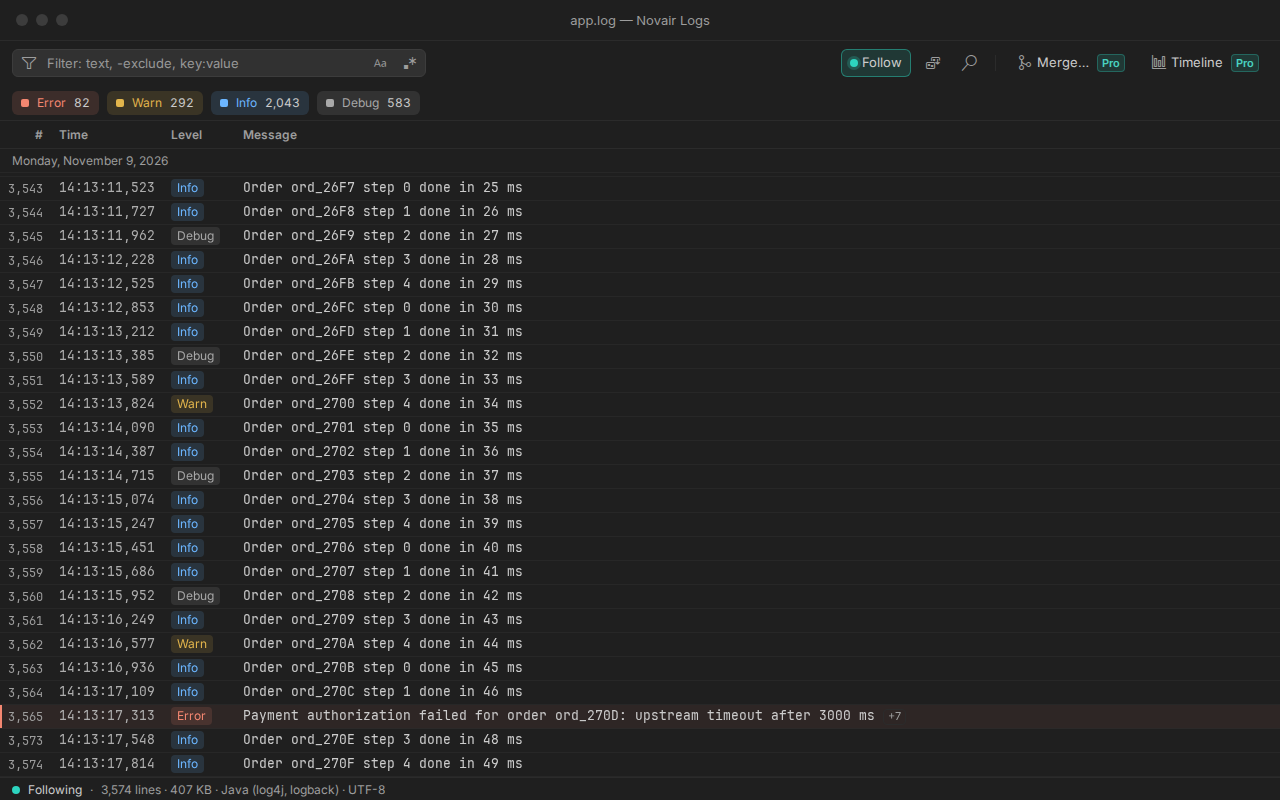
- Follow it liveNew lines arrive without flicker. Scroll up and following pauses; press End and it resumes. Rotation and truncation are handled.
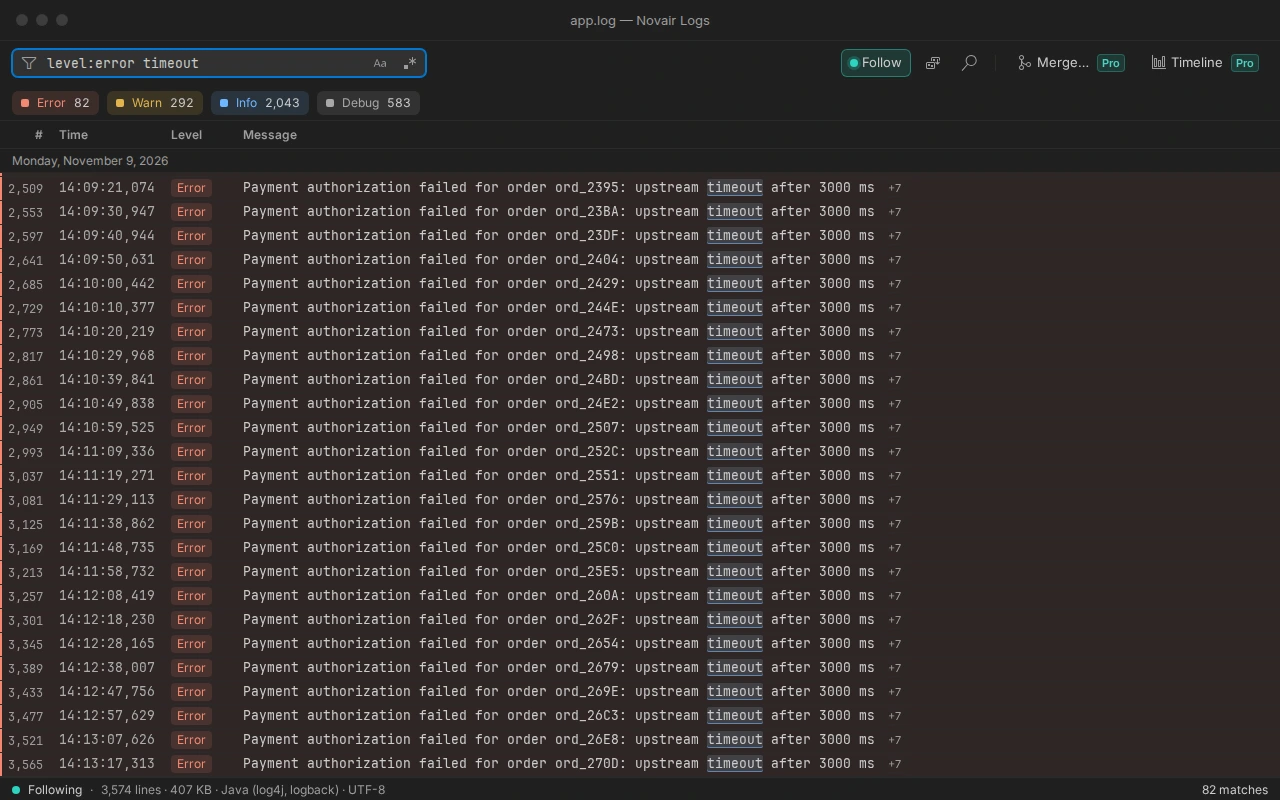
- Find the errorClick a level, or type level:error timeout, status:>=500 or a regular expression: the filter applies in place, even while following, and counts what it found.
See it at work
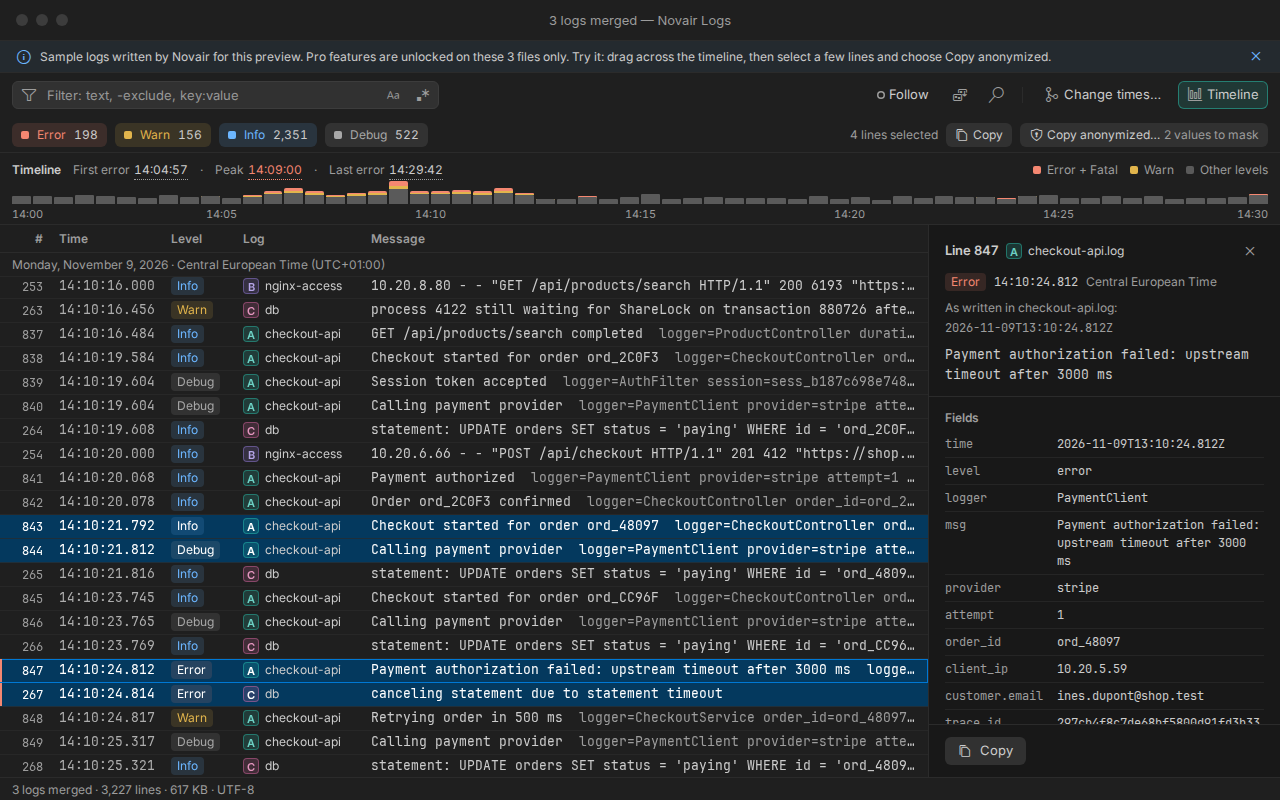
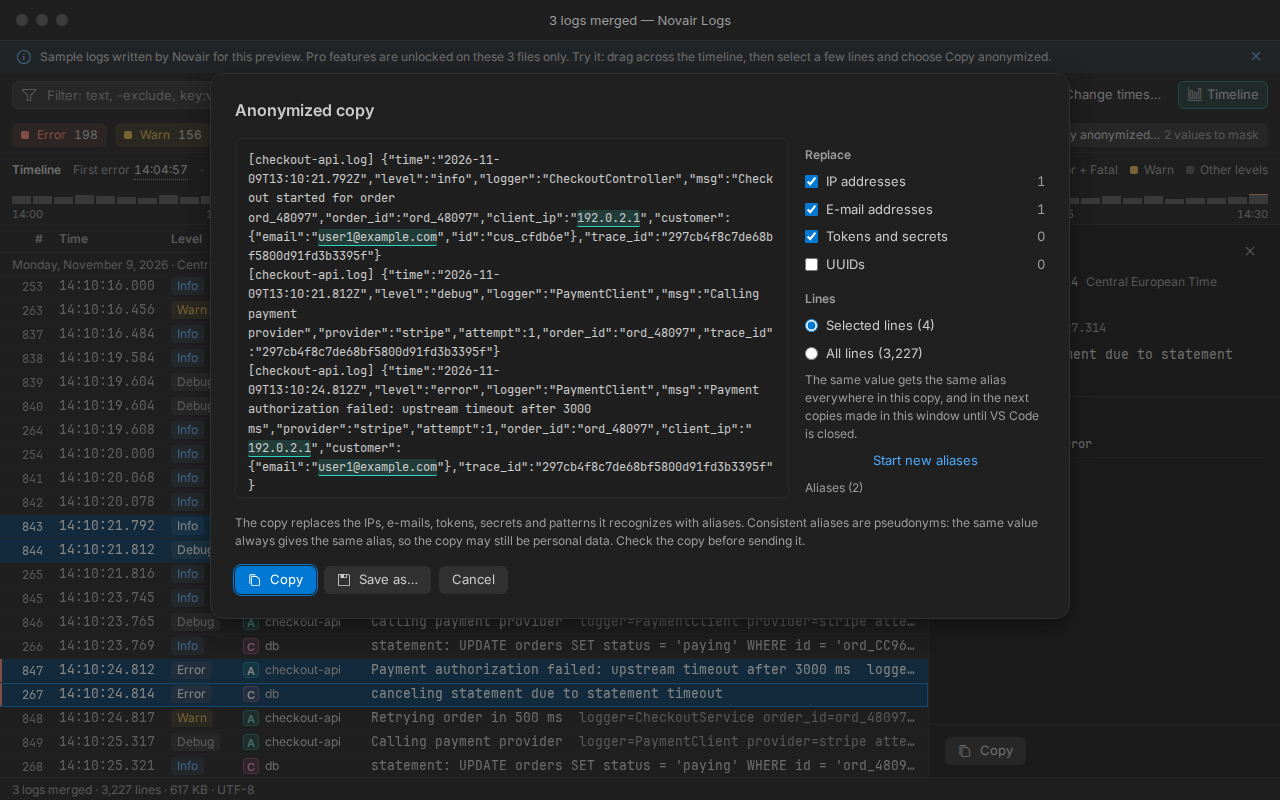
Real captures of the extension in VS Code, on sample logs written by Novair. Click one to see it full size.
What the extension does
A log viewer, not a log platform: no agent, no server, no account. It opens the files you already have, read-only, and keeps up with them while your application writes.
Large files, tested with a 2 GB file
Large log files read in a stream, the end of the file shown first.
Live tail that keeps up
Log rotation and truncation handled, new lines added without flicker; following pauses when you scroll up and resumes when you come back to the end.
Levels you can see
Levels detected and shown as labels with their colour (Trace to Fatal), with the count of each level.
Filter by level, regex or field
Filter in place by text, exclusion, regular expression, level or field (JSON, logfmt, web access logs: key:value, status:>=500), even while following; no file is saved or created.
Find, go to, entry detail
Find with a match counter (3 / 128) that highlights the right line; go to a line or a time. Entry detail: stack traces grouped with their line, JSON shown as a tree, filter by any value.
Formats recognized
JSON lines, logfmt, log4j and logback, Python logging, nginx and Apache access logs, syslog, ISO 8601 timestamps; ANSI colours rendered.
Merge logs by time (Pro)
Merge up to 8 logs into one view by time, with a time zone and a clock adjustment for each log; the order inside each log never changes, and the merged view keeps following live.
Anonymized copy (Pro)
The copy replaces the IPs, e-mails, tokens, secrets and patterns it recognizes with aliases. Consistent aliases are pseudonyms: the same value always gives the same alias, so the copy may still be personal data. Check the copy before sending it.
Error timeline (Pro)
Entries by level over time, first error, peak and last error; click to jump, drag to filter a time range.
Free, and Pro when you need it
One incident, three logs, one timeline, a clean extract to send. The free version reads, follows and filters your logs with no time limit. Pro is for the incident: several logs on one timeline, and a copy you can send. Try it first on the sample logs, with no key: run “Novair Logs: Open the sample logs (Pro preview)” from the Command Palette.
Free
No time limit, no account, no banner.
- Large log files read in a stream, the end of the file shown first
- Live tail that keeps up
- Levels detected and shown as labels with their colour (Trace to Fatal), with the count of each level
- Filter by text, exclusion, regular expression, level or field, even while following
- Find with a match counter (3 / 128) that highlights the right line
- Newest first in one click
- Entry detail
- Light, dark and high contrast themes; English and French
- Merge logs by time
- Anonymized copy
- Error timeline
Pro
One key for one person, on up to 5 machines.
- Everything in the free version
- Merge up to 8 logs into one view by time, with a time zone and a clock adjustment for each log
- Anonymized copy: IPs, e-mails, tokens and secrets replaced by consistent aliases, with a preview
- Error timeline: first error, peak, last error; drag to filter a time range
- All 1.x updates included
- Works offline once activated
One payment, no subscription. All 1.x updates included. Refund within 14 days.
Payment, invoice and VAT handled by Gumroad, merchant of record.
Frequently asked questions
Are my logs sent anywhere?
Your logs never leave the computer that reads them: no log data is sent. The only network call is the licence check: activation needs one connection to api.gumroad.com from that computer (in a Remote-SSH, WSL or dev container window, the remote computer), through your VS Code proxy settings; after that, Pro works offline. Without a licence key, the extension makes no network call. The licence check carries the product identifier and the key, never a log line or a file. No telemetry.
How large a log can it open?
Logs are read as a stream and the end of the file shows first. The largest file we measured is 2 GB: indexing in the background, the editor never blocked for more than 92 ms, and following kept up with 990 new lines per second.
Which formats are recognized?
Formats recognized: JSON lines, logfmt, log4j and logback, Python logging, nginx and Apache access logs, syslog, ISO 8601 timestamps; ANSI colours rendered. Any other text log opens as plain text, with the levels it writes in words (ERROR, WARN…).
What is not covered?
Not covered in this version: compressed files (.gz, .zip, .zst: decompress them first); binary logs (journald, Windows Event Log); files on a virtual file system (copy them to a folder on this computer); following the newest file of a folder by pattern; editing log files. Merging: up to 8 logs at a time.
What is the difference between free and Pro?
Free opens, follows, filters and searches your logs, with levels, detail and every format above, with no time limit. Pro adds the incident tools: merging up to 8 logs by time, the error timeline and the anonymized copy. The sample logs unlock all three, with no key.
Can I send the anonymized copy to a vendor's support as is?
The copy replaces the IPs, e-mails, tokens, secrets and patterns it recognizes with aliases. Consistent aliases are pseudonyms: the same value always gives the same alias, so the copy may still be personal data. Check the copy before sending it. You choose what is replaced (IP addresses, e-mail addresses, tokens and secrets, UUIDs) and add your own patterns.
On how many machines can I use my key?
One key for one person, on up to 5 machines. A machine is counted the first time the key is activated in a VS Code installation: a new computer, VS Code reinstalled with its data erased, or a non-persistent virtual desktop whose identifier changes. Entering the key again, trying again after a network error, removing and re-entering it on the same installation, or updating the extension uses nothing. New computer or VS Code reinstalled? Write to support@novair.app with your purchase e-mail and we reset the count.
How much is it, and can I get an invoice with or without VAT?
Pro costs EUR 24.17 + VAT where applicable, paid once; Gumroad, merchant of record, shows the exact amount for your country at checkout. Need an invoice? Use the “Generate” link at the bottom of your Gumroad receipt: enter your name and business address, add what your accounts need under “Additional notes”, and download the PDF. An EU business that paid VAT can enter its VAT number there: Gumroad refunds the VAT and the invoice shows no VAT. Gumroad cannot change an invoice afterwards.
How do I activate Pro?
Open the Command Palette (Ctrl+Shift+P, Cmd+Shift+P on a Mac), type “licence key”, choose Novair Logs: Enter my Pro licence key and paste the key from your Gumroad receipt.
My company network blocks Gumroad. What happens?
Activation needs one connection to api.gumroad.com, through your VS Code proxy settings. If it cannot get through, the free version keeps working, and you can ask for a refund within 14 days at support@novair.app.